

ParkU is an application to help parking management in malls and offices.
TEAM
Solo Project
TOOLS USED
Adobe XD, Miro and Figjam
TIMELINE
4 Days
WHAT I DID
I carried out user interviews and did secondary research on the existing features. Ideated various features to be incorporated and worked on the visual screens and prototypes.

TLDR / OVERVIEW
ParkU, is an application that simplifies parking management for malls and office buildings. With an intuitive interface that provides an overview of all parking bays, ParkU makes it easy to assign parking spots and increases efficiency. Customers can pre-book their parking, eliminating the hassle of finding a spot and allowing managers to manage the parking efficiently. Additionally, ParkU provides detailed insights on revenue, allowing managers to make informed decisions and report to stakeholders.
CHALLENGE
Let's take a look at the design challenge.
Use Case: You have to design a web application for a Parking Manager who is managing a Parking lot for a mall approx 10,000 vehicles (two-wheeler and four-wheeler) are parked on weekdays. Most Importantly the range may increase on weekends.
Task: Design visual screens covering the following phases in a customer journey:
-
Entry registration of the vehicle.
-
Search for a parking space, vehicle no (parked).
-
Parking lot space definition with occupancy and vacancy.
-
Revenue analytics daily parking happening in the mall.
BACKGROUND
Background of the parking system in India
-
Malls have become popular destinations due to their convenient parking facilities, which has led to increased challenges for mall staff, such as parking managers, security personnel, and logistics support.
-
Parking lots at malls vary in size, with some having as many as 10,000 parking bays, which requires significant coordination and management.
-
The study focuses on the challenges mall staff faces regarding single-level parking in India.
-
Despite the challenges, many startups are working on creating customer-oriented applications to improve the mall experience.
Let’s look at a scenario from the perspectives of parking managers and securities.
-
Ramu is a parking lot manager. Like every other morning, he wakes up and goes to the office just like us. He wants to work efficiently and easily and be occupied and stressed out. His typical working day includes manually entering the car’s data and pulling out a ticket from the dispenser. During weekends the process is entirely draining in the hot sun, standing outside with a mere umbrella, and is asked to work overtime to meet the demand.
-
After the car enters the mall parking, he sends a message to his colleagues through his walky-talky, which sometimes doesn’t work. His colleagues operate in a different way; they have no idea how many cars are left. They get to see data on the LED Board, which is not always updated. There is no coordination which leads to chaos in the basement. Some angry customers don’t listen and park wherever they like. At the end of the day, Ramu and his colleagues are physically drained.
PROCESS
Design process

RESEARCH
Understanding the problem
-
Manual ticketing process at entrances.
-
Lack of coordination from the entrance to the parking bay.
-
The parking manager is unaware of the slots available. A feature that shows the total number of cars parked is not updated frequently.
-
No proper guidance for people with disabilities, and no preferences are given to them.
-
Tickets of customers getting lost.
-
Time-consuming to determine a parking place as the staff confuses the users.
-
No monitoring of funds collected and a live revenue analytics screen.
-
Parking Managers can't view the parking bay while sitting in one place.
-
Chaos during busy days such as holidays and weekends.
-
Overcrowding due to payment delay lines.
-
Misuse of funds collected by parking managers.
RESEARCH
Competitor analysis
I tried analyzing a few of the applications used in India and determining the features they offer. Though most of the applications here don’t talk about the admin features for the parking manager, I narrowed down a few points keeping the whole infrastructure in mind. This helped me in determining a few key features of “ParkU.” Below is the brief competitive analysis I did using the resources I found on the internet.

IDEATE
Ideating the concept
In this section, I will be briefly introducing the entire scenario which I thought about from both the user and the parking manager’s perspective. In the following sections, I will explain the user flow and the Information Architecture.

Let’s go through the whole scenario:
-
Assuming there is an application on the users’ mobile phones, they can book their parking in advance directly through the app. This gets reflected on the parking manager’s dashboard.
-
A confirmation message is sent to the user. As soon as the car reaches the mall, the gates open up and using the maps navigation navigate to the particular parking spot (For users who have not installed the app, the parking manager enters the details, and the car number is stored with the help of a camera present).
-
After the registration process, customers receive a QR code to avail of discounts when shopping (assumption). This can be used to search the cars if the customer forgets where his/her car is parked; most parking managers have a scanner.
-
For those who don’t have the application, the manager states which zone they got to go to, and it is transferred to the ground staff, who get details of the car and assist them until the parking is complete. (Assumption: each zone is assigned 2-3 staff with tablets).
-
Existing LED green blinkers turn red and automatically update the parking manager's dashboard as an occupied slot, and the status changes to complete.
-
On exiting, customers can use the already enabled fast tag, which deducts a particular amount per the time spent in the mall. Users who do not have a fast tag can manually pay or pay on the app once they reach the exit.
IDEATE
Solution
-
A dashboard that gives important information about the slots occupied and available and an assumption that there might be external bookings for a parking slot.
-
Fast and easy registration process using features like camera detection of number plates directly synced to the application (paperless and ticketless).
-
A dashboard with the parking layout to get an idea of the parking bay and the slots occupied for smooth coordination with the staff, assuming the staff has tablets that are coordinated with the parking manager upon entry.
-
Auto sync feature with the customers’ phone for navigation until the parking bay (Assuming an external app).
-
Leveraging existing infrastructure such as FastTag during exit to minimize contact and smooth flow at the exit.
-
Revenue analytics with filters to keep a tab on the inflow of vehicles and revenue can be used for audit purposes by downloading the reports in a pdf or excel format.
IDEATE
User flow

IDEATE
Information architecture

WIREFRAME
Putting my thoughts on paper
After having an architectural understanding based on the hierarchy of elements and the flow, the solutions that the parking manager could benefit from were fleshed out. Sketching out wireframe ideas on paper helped me visualize the flow and eased the process of zeroing down the best features that were feasible.


DESIGN
Visual design of ParkU
After completing the wireframes, I designed the screens to keep usability in mind.
Here is a brief overview of the key aspects which I will further elaborate below each screen:
-
Introduction of a dashboard that gives an overview of the available parking spots, occupied parking spots, booked parking spots (assumption) and total revenue.
-
A booking screen to assign a parking slot easily. A three-step process with feedback on every stage with the status bar.
-
An overview of the entire parking lot where the parking managers can take a look at the whole.
-
A revenue screen that gives important statistics to improve business or for audit purposes.
I have used SF Pro Display and blue as a primary color to instill joy and confidence as, most of the time, parking managers spend time in basements. Below is the color palette I used:

Dashboard

-
In the dashboard, there are a few important things that are displayed. The parking manager can glance at the total parking spaces, occupied parking spaces, booked parking spaces, and the total amount collected.
-
The latest bookings show the list of bookings done by the booking manager, which are either pending, processing, or approved (compete).
-
A filter that lets the parking manager filter according to the status or type of vehicle to segregate in case a problem occurs.
-
The add booking button is a fast way to add a new booking as soon as a car enters a mall.
Add booking

-
Once the parking manager clicks the new booking he/she is redirected to the booking page.
-
The three-step process tells the manager which stage he/she is in. The main goal was to keep the registration simple and user-friendly.
-
The two options of 2-wheeler and 4-wheeler are selected, the registration number is assumed to be auto-entered with the camera capture feature.
-
Since accessibility is being talked about a lot nowadays I decided to add a feature of parking for the disabled, most of the time people having disabilities are facing problems when it comes to parking. Most of the time people just park in these allocated areas. This feature helps to allocate a particular spot next to the mall.
Slot allocation
-
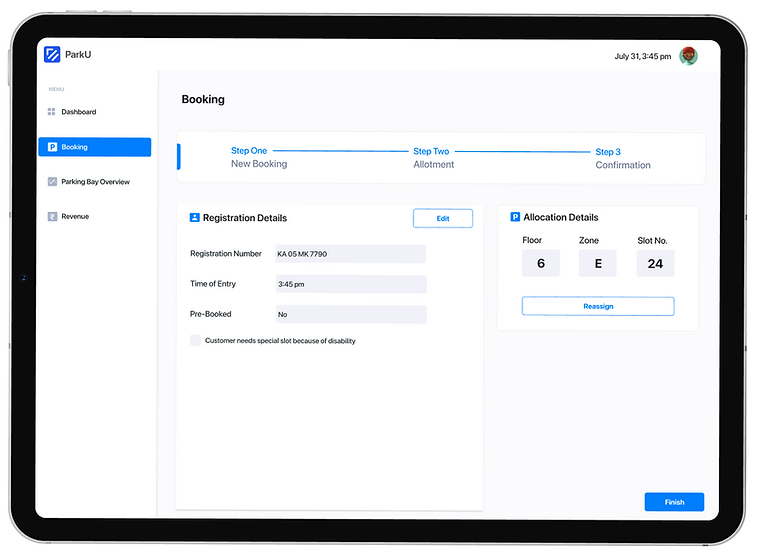
After the allocation from the backend, it goes to the final stage which is stage 3, here the registration details are displayed and the assigned allocation is displayed.
-
The allocation details are listed in order of the floor, zone and parking spot number.
-
Since this process is automated I have assumed that the parking staff at the respective floors get this alert on the tablet and guide the customer to the particular spot.
-
Once the car is parked the LED light turns red and is auto-updated on the system.
-
In case someone else parks the manager can reassign the parking spot again either manually or automatically.
Parking bay overview

-
Parking Bay Overview gives a whole view of the parking lot.
-
Each zone is demarcated with each parking spot color coded, green - available spots, grey - occupied, and blue, which are booked.
-
On clicking the occupied slots, the manager can see which vehicle is parked.
-
The dynamic control of clanging floors helps the manager to switch easily. The parking manager can be kept updated on the floor’s proceedings.
Revenue

-
The last feature is the revenue screen, the main goal is to make the parking manager and stakeholders an overview of the whole business and the total amount collected is displayed.
-
The graph is updated as per the timings and the stakeholders can analyze peak business hours and the hours where the revenue is not great ( Scope for offering discounts during this period).
-
The download feature helps to download the report in PDF or Excel format for audit purposes and can serve as a record.
-
The highlights below give the total number of 4 - wheelers, 2 - wheelers and bookings these can be used for audit purposes to find the peak hours, etc.
-
On the right-hand corner, there is a feature of key insights which picks up important information using technology and can be viewed fast.
-
The source of revenue can be tracked by checking different modes such as Cash, Card and fast tag. These can be used to analyze and keep track of the different breakups.
REFLECTION
Things I learned.
Fast-paced design tasks
Make the most of secondary research
The fast-paced task at hand allowed me to strengthen my skills in resourceful problem-solving, utilizing secondary research to gather information and generate creative solutions quickly.
Recruiting participants for user interviews can be a challenge. Through this project, I honed my secondary research skills and gained a new perspective on design, which supplemented my approach.
Let's work together.


